DJ gear
AlphaTheta XDJ-AZ vs OPUS-QUAD
Compare the XDJ-AZ and OPUS-QUAD by layout, USB libraries, zone routing, player expansion and how each works in a booth.
Compare the routing before the layout
| Decision | XDJ-AZ | OPUS-QUAD |
|---|---|---|
| Standalone playback | Four decks | Four decks |
| External players | Compatible CDJs can take part in Pro DJ Link | Connect their audio to an appropriate input |
| Separate programme for another room | Standard master and booth routing | Zone output can send a separate programme |
| Headphone monitoring | Wired and compatible SonicLink option | Plan on wired DJ monitoring |
| U.S. regular maker-store price | $3,449 | $3,449 |
| Storage USB ports | Two top USB-A ports | Two top USB-A ports and one rear USB-A port |
Both units have a 10.1-inch touchscreen, onboard Wi-Fi and four-deck standalone playback. The XDJ-AZ borrows its layout from AlphaTheta’s club hardware and puts deck status in the jog displays. For booth practice, look at where the jog wheels, mixer and source selection sit. On either unit, check which controls you use to move between deck layers three and four.
The OPUS-QUAD can play background music in a second space while you mix for the main room. A booth output lets you set the level of the main mix at the DJ position. Buy for the second signal if you have somewhere to send it.
Think through a four-deck set before deciding how much you care about the layout. Suppose decks one and two are playing, and you want to preview something on deck three. Check how you bring deck three under the jog, which channel you cue and what the display tells you about the active layer. Then return to the first deck without touching its playing track. Both units have two jog wheels, so the ease of those switches may matter more to you than differences on the feature list.
For a booth with separate decks, draw the connections from each external player to a mixer channel. If you expect to share one library over Pro DJ Link on the XDJ-AZ, check the exact players, firmware and network connections against the maker’s diagram. Separate analogue inputs are useful for a guest who brings their own deck and media. A linked drive is useful when you want to browse or load tracks across compatible units. Work out which of those jobs you need before adding both extra hardware and network gear.
If you are buying the XDJ-AZ for SonicLink, see which wireless headphones can take a booth cue and when a separate transmitter is needed.
Check the USB and the room
Both devices are listed by rekordbox as supporting OneLibrary. If you need to share the drive with a different player, look up that model in the rekordbox export matrix and test the drive you will bring. If you need to share a USB with a linked external player, check both model numbers and the library format. Put a local copy of the music on media you have checked if the venue’s Wi-Fi or sign-in is unreliable.
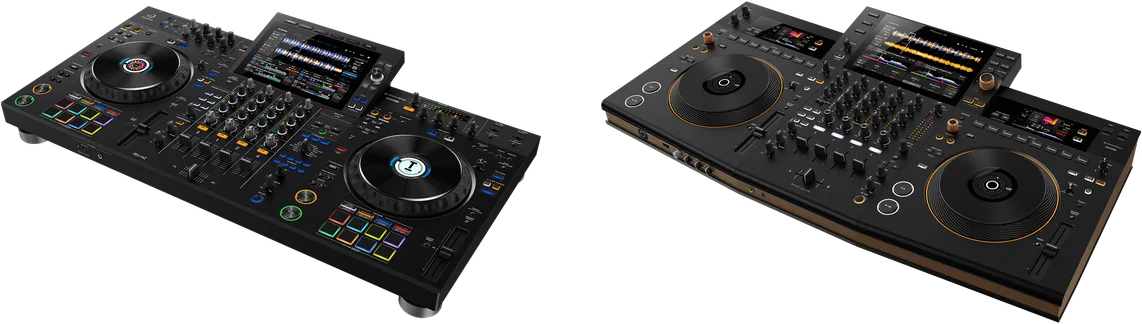
Both U.S. maker listings show a regular price of $3,449. Compare current delivered prices and add the case and cables. For a long-term purchase, decide whether you need external-player networking and SonicLink, or a separate signal for a second space. If you mostly play two decks from USB, the standalone guide includes smaller options. If you need independently replaceable players, look at the CDJ buying guide.
For a two-room event, start with someone standing in each room during soundcheck. Choose which source the OPUS-QUAD will send to the zone and tell the other person what they should hear. Change the main mix and verify that the second room still gets its own programme. Then check which level control feeds which space. If the venue sends one mix to both rooms from its own sound system, the extra zone output may go unused.
For headphone monitoring, include the headphones and any transmitter in the scenario. The XDJ-AZ includes compatible SonicLink transmission, but you still need a supported pair. Try both cue and master on the headphones you plan to use. Take a wired pair or cable if you share the booth, so a flat battery does not leave you without cue monitoring.
If you have more than one USB device, put the long-running library where people are least likely to remove it by accident. Keep a spare copy and give a guest a known free port. The third storage port on the OPUS-QUAD can be useful when you keep an installed drive and still need to make room for visitors. A guest should be able to find their first track before the previous set ends.
If an integrated rig goes out for service, the mixer and both jogs go with it. For a mobile business, ask what equipment you can rent locally for an emergency and whether your prepared media works on it. If you need a rig for only one or two events, compare hiring the configuration and taking a test USB to the rental desk.
FAQ
Can both systems play four decks without a computer?
Yes. Each has four playback decks and two physical jog wheels. Use the deck-selection controls to switch which layer each jog controls.
Are the two systems compatible with the same rekordbox USB?
Both support OneLibrary. If the drive also goes into an older player, export whichever library formats that other player requires and check the playlists on both units.
Is a zone output the same as a booth output?
A booth output gives the DJ separate control over the level of the main mix at the DJ position. The OPUS-QUAD’s zone output can send different music to a second area.
Sources.
Continue reading
Read next.
 Crate digging~5 min read
CDJ vs DJ Controller: Which Setup Fits?
Compare CDJs, laptop controllers and standalone DJ units by where audio plays, how they connect, and what you need to supply at a venue.
 Crate digging~5 min read
Pioneer DJ DDJ-FLX4 vs DDJ-400
Choose between a new DDJ-FLX4 and a used DDJ-400. Compare software, ports, mic routing and the checks to make before paying for a used controller.
 Crate digging~5 min read
Best Standalone DJ Controllers for USB and Laptop-Free Sets
Compare standalone DJ systems by USB library, decks, battery power, audio outputs and motorized platters. Pick an all-in-one for your workflow.
 Crate digging~5 min read
Best 4-Channel DJ Controllers for Decks and External Gear
Compare four-channel DJ controllers by software decks, analogue inputs and mixer operation. Check what your turntables and media players can use.