DJ gear
Pioneer DJ DDJ-FLX4 vs DDJ-400
Choose between a new DDJ-FLX4 and a used DDJ-400. Compare software, ports, mic routing and the checks to make before paying for a used controller.
What actually changes?
| Check | DDJ-FLX4 | DDJ-400 |
|---|---|---|
| Main software path | rekordbox or Serato DJ Lite, with other supported apps | rekordbox and compatible djay versions |
| USB connection | USB-C | USB-B |
| Mixing assistance | Smart CFX and Smart Fader | Conventional control layout |
| Mobile | Options depend on the app, device and connection | Compatible djay setups, subject to device support |
| Buying condition | Current model and available new | Archived model, usually bought used |
| Master and headphone sockets | Stereo RCA master and 3.5 mm headphone | Stereo RCA master and 3.5 mm headphone |
I’ve used both controllers. The FLX4 keeps the familiar two-jog, two-channel format. If you want to use Serato, the FLX4 works with DJ Lite. Check what a Pro licence adds before paying for it. The DDJ-400 remains a useful rekordbox controller, and Algoriddim documents compatible djay setups.
Bluetooth can connect the controls to some mobile apps. Use the documented audio connection for your phone or tablet, especially if you plan to cue on headphones. Check which connection supports the controls, master signal and cueing on your exact phone or tablet. The FLX4’s USB-C ports have distinct connection and power roles in supported configurations.
If you already own a 400 and mix in rekordbox on a laptop, try the library and controller together before shopping. Load an ordinary two-track mix, cue both decks and check whether every control you actually use is within reach. If you want to move to Serato and keep a compact controller, that is a reason to change hardware. If you need another mixer channel for an external deck, the FLX4 changes the software options but still leaves you shopping for a different class of controller.
People learn with the jogs, pitch faders and channel controls on both units. On the FLX4, try Smart Fader and Smart CFX with the music you mix. Smart Fader can help with some transitions. You can also turn the assistance off and work the tempo and EQ yourself. If you already like your normal mixing controls, check the cable and software differences before making a purchase on the strength of either Smart function.
For a phone-based setup, look up the exact app and phone connection before you order. Check whether the phone and controller require external power in that mode. Then trace the master from the phone or controller to speakers and headphones. If the app can see a controller over Bluetooth, that answers the control question. It does not tell you how you will hear the cue. For a first gig, take the wired connection you have already tried.
Is an older DDJ-400 a good used buy?
Ask the seller to show both jog wheels and faders responding in software. Check both RCA channels, the headphone socket and the USB connection. A flaky USB port is more important than a scuffed enclosure. Confirm that your own software version and OS support the controller, and budget for the correct cable if your computer only has USB-C.
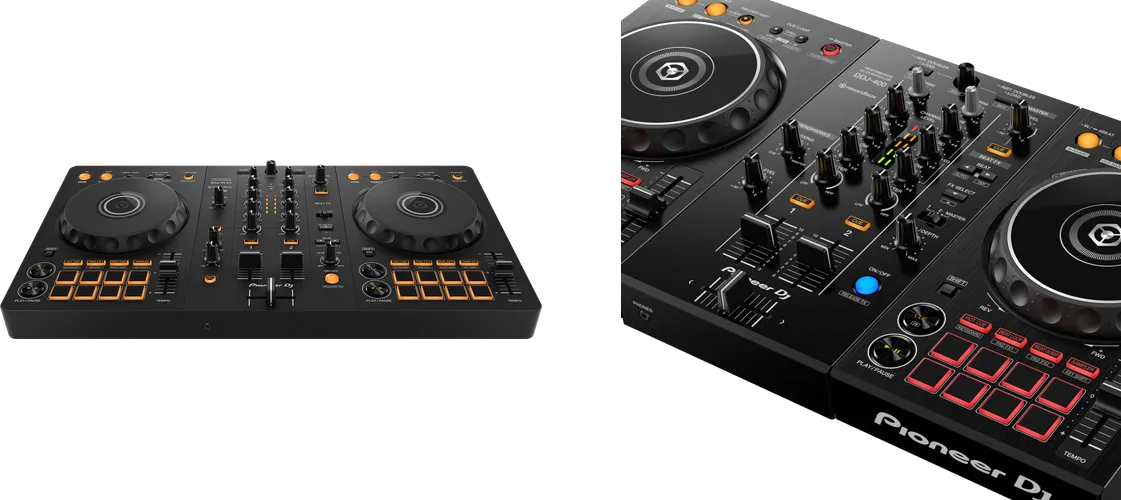
Pioneer DJ lists the black FLX4 at $329 in the U.S. If the used price is close to the cost of a new FLX4 after fees and a cable, I’d buy the newer unit with its warranty. With a working DDJ-400, I’d keep it until I needed another input, more channels or software the controller could not run. See beginner DJ controllers and rekordbox vs Serato for those related choices.
When you inspect a DDJ-400, bring a laptop with the supported app already installed and the data cable you expect to use. Load a known track on each deck. Move the crossfader and both channel faders gently through their travel and listen for a channel dropping out. Try the cue buttons with wired headphones and hear each side of the stereo master output. An RCA socket can look fine even if one channel cuts in and out. Try a second known working cable if the first connection drops.
For an online purchase, ask a seller to show the computer recognising the controller and to demonstrate cue and master audio separately. A video of the lights coming on tells you the unit has power. It leaves the controls, output sockets and data connection untested. Ask what the seller includes, and check return terms before deciding how much a used listing saves.
Factor in the correct cable and any selling fees or shipping. A USB-C laptop can run the DDJ-400 over an appropriate USB-C to USB-B data connection. A USB-C charge lead does not replace that cable. If the older unit needs repair or the deal leaves you with no return option, put a value on the difference in condition and seller support. The comparison is between two working rigs you can actually use with your computer.
FAQ
Does the DDJ-400 still work with rekordbox?
The DDJ-400 is listed as a Hardware Unlock device. Confirm support for your exact rekordbox version and operating system before buying used.
Can I plug either controller straight into a USB-C laptop?
Yes, with the correct data cable. The FLX4 uses USB-C at the controller. Choose a USB-C to USB-B data cable for a DDJ-400 if your laptop only has USB-C ports.
Does Bluetooth on the FLX4 let me cue wirelessly?
Bluetooth can carry controller commands in supported mobile configurations. For cueing at the controller, use the documented wired setup and connect wired headphones to the controller.
Sources.
Continue reading
Read next.
 Crate digging~5 min read
Best Standalone DJ Controllers for USB and Laptop-Free Sets
Compare standalone DJ systems by USB library, decks, battery power, audio outputs and motorized platters. Pick an all-in-one for your workflow.
 Crate digging~5 min read
Best 4-Channel DJ Controllers for Decks and External Gear
Compare four-channel DJ controllers by software decks, analogue inputs and mixer operation. Check what your turntables and media players can use.
 Crate digging~6 min read
Best Serato DJ Controllers by Licence and Layout
Compare Serato controllers by Lite and Pro entitlement, platter type and inputs. See which hardware needs a subscription or an extra licence.
 Crate digging~6 min read
Best DJ Controllers for Scratching
Compare static and motorized jogs, crossfaders and battle layouts. Pick a scratch controller that works with your software and budget.