DJ gear
Best 4-channel DJ controllers
Compare four-channel DJ controllers by software decks, analogue inputs and mixer operation. Check what your turntables and media players can use.
Four faders with two sets of deck controls
| Controller | Deck surfaces | Outside decks | Main buying reason |
|---|---|---|---|
| AlphaTheta DDJ-GRV6 | Two fixed jogs | No line or phono deck inputs | Four software decks with a lower hardware spend |
| Pioneer DJ DDJ-FLX10 | Two fixed jogs | Four line connections, two switchable to phono | Combine computer decks with external playback |
| RANE FOUR | Two fixed jogs | Two switchable line/phono inputs | Four-channel Serato setup with fixed jogs |
| RANE PERFORMER | Two motorized platters | Two switchable line/phono inputs | Four-channel Serato setup with moving platters |
With two jog wheels, use the deck selection buttons to change which software deck each side controls. Each channel still has its own mixer fader. If you want four platter surfaces within reach without changing layers, compare separate players and a four-channel mixer.
Make a four-line channel list with a source beside each fader. A computer-only list might contain two songs, a loop and an acapella. A hybrid list could have two software decks and two turntables. Both need four faders. Only the hybrid list needs a pair of external inputs with the correct signal level. If you also bring a microphone, find its own socket and look at how its level is controlled before assigning it a deck channel on paper.
When you try a controller, load four tracks and switch each jog between its two assigned decks. Check which lights or screen indicators tell you where the controls are active. The fader you can see is useful only if the deck button lets you reach the right source quickly. If you handle a main track and a separate loop on the same side, try that specific pair of tasks before deciding whether layering is comfortable.
Four tracks on a laptop or outside decks
The $899 DDJ-GRV6 suits four software decks on a computer. AlphaTheta limits rekordbox on iOS and Android to channels 1 and 2. The controller has a microphone input and RCA booth output, and all its deck audio comes from the app. If you own turntables or media players, the FLX10 gives you four line inputs, two with a phono switch. It also has balanced XLR master outputs and two USB-C computer connections. AlphaTheta DDJ-GRV6 · Pioneer DJ DDJ-FLX10
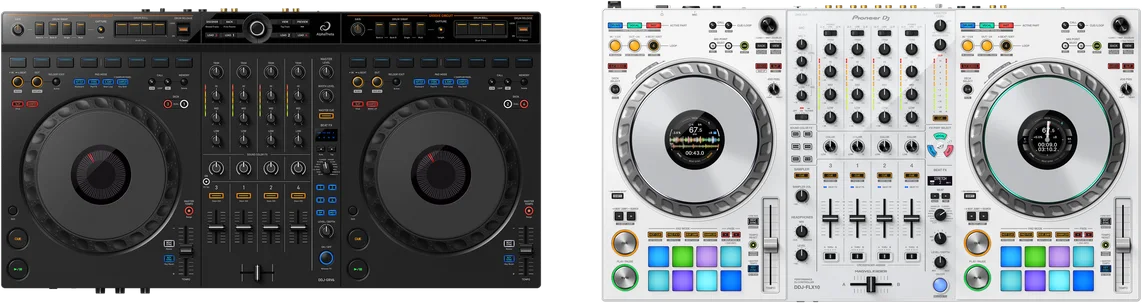
Check what the phono input does in your intended mode. A turntable with a conventional phono signal needs the phono stage, while a player or turntable set to line needs a line input. If the goal is control vinyl with your software, there is another step. Confirm the supported DVS hardware and entitlement before buying. Serato controller licensing
For the GRV6, plan around the host you will actually bring. Four laptop decks are useful if your controller stays connected to a computer. If your practice rig is a phone or tablet running rekordbox, the two-deck limit changes which part of the investment you use. Find the supported app and host combination before buying four channels for a mobile setup.
On the FLX10, choose which sockets the two phono sources occupy before buying cables for everything else. The line and phono positions that share a channel are alternatives. Two turntables and two line sources use all four external channels, so there is no fifth mixer fader left for an extra player. If more sources need to stay patched, budget for additional mixing or a different setup. Then check speaker routing separately. Four input channels do not determine whether your booth monitors can have a level independent of the main speakers.
If two DJs will use the FLX10’s computer connections, agree which faders will switch to the next laptop and when. Try the sequence with two prepared computers before an event. Confirm that you can keep one source playing while the other DJ connects and that the next deck assignment is clear. Put the connected computers where both cables can sit without tension. Two ports do little to help if a crowded stand leaves nowhere for the second laptop to go.
Check the mixer in the modes you intend to use. Route ordinary records through the input you plan to leave connected, then check whether the controls you need are available with the laptop shut. Repeat on the software channels with the app open. Some features follow the software, and a usable external audio path is a separate requirement from full control over a loaded track. Keep a note of your usual channel assignments so you can reset the input switches after a handoff.
Fixed or motorized in a four-channel Serato rig
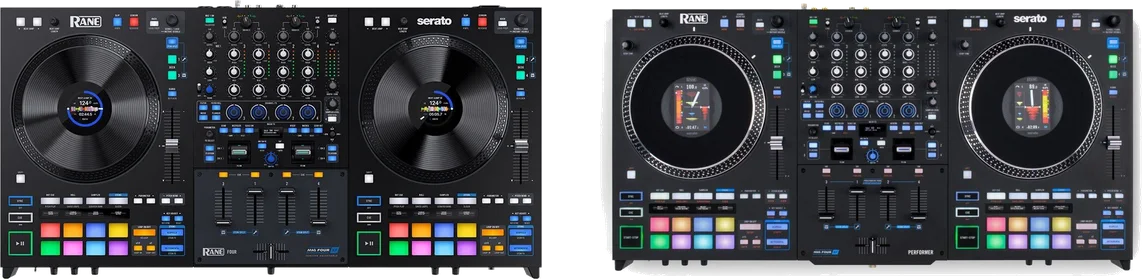
The RANE FOUR and PERFORMER both unlock Serato DJ Pro. Pick the FOUR for fixed jogs and direct track-separation controls. Pick the PERFORMER if you want the platter to move under your fingers. Include the case when you measure the space you’ll need. If you usually play two channels and want a smaller rig, compare scratch controllers. Serato RANE FOUR · Serato RANE PERFORMER
Traktor users can look for a used Kontrol S4 MK3. Confirm current OS compatibility, the condition of the haptic jogs and the software licence with the seller. Native Instruments points its older S4 store links to the DJ controller range. For playback from USB without a computer, see the standalone guide.
Before choosing between the RANE models, check where you will carry and play the unit. Put the dimensions with the case next to the free surface in the booth. Leave room for the laptop stand, the rear plugs and your hands around the faders. Then prepare one short Serato session containing the parts, loops or outside sources you would actually use. The FOUR and PERFORMER can serve the same four-fader job. The meaningful comparison is how the fixed jog or moving platter changes your handling during that same session.
FAQ
Do all four channels have inputs for record players?
Check the input list for phono and look for a switch marked line/phono. A controller can have four faders with no turntable sockets. A turntable with a built-in preamp can use a compatible line input.
Does four channels mean I can play four tracks at once?
Yes, when your software, controller and setup support four decks. Each fader handles one channel. You may have to switch a jog wheel to a different deck to cue or move that track.
Can a four-channel controller replace a standalone mixer?
The FLX10 accepts outside audio sources and can mix those signals with its hardware controls. Confirm how the channels and effects work with the computer disconnected. Controllers that receive their deck audio from software need a laptop for playback.
Sources.
Continue reading
Read next.
 Crate digging~6 min read
Best Serato DJ Controllers by Licence and Layout
Compare Serato controllers by Lite and Pro entitlement, platter type and inputs. See which hardware needs a subscription or an extra licence.
 Crate digging~6 min read
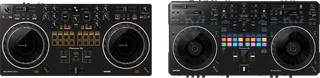
Best DJ Controllers for Scratching
Compare static and motorized jogs, crossfaders and battle layouts. Pick a scratch controller that works with your software and budget.
 Crate digging~5 min read
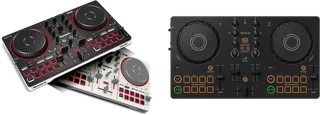
Best Budget DJ Controllers Under $300
Compare affordable DJ controllers by software, controls, cueing and outputs. See what to buy under $300 and when the FLX4 is worth extra.
 Crate digging~5 min read
Pioneer DJ DDJ-FLX4 vs DDJ-400
Choose between a new DDJ-FLX4 and a used DDJ-400. Compare software, ports, mic routing and the checks to make before paying for a used controller.