DJ gear
Best standalone DJ controllers
Compare standalone DJ systems by USB library, decks, battery power, audio outputs and motorized platters. Pick an all-in-one for your workflow.
Compare decks and library formats
| System | Standalone decks | Library to prepare | Reason to choose it |
|---|---|---|---|
| AlphaTheta XDJ-AN | 2 | rekordbox | Compact USB system |
| AlphaTheta XDJ-AZ | 4 | rekordbox | Club-style controls and Pro DJ Link |
| Denon DJ PRIME 4 G2 | 4 | Engine DJ | Four decks in an Engine DJ setup |
| RANE SYSTEM ONE | 2 | Engine DJ | Motorized platters |
| Pioneer DJ OPUS-QUAD | 4 | rekordbox | Separate zone output |
A standalone system has a playback engine, mixer and screen. A computer can still help you build the library before a set. If you want to plug in a prepared drive at venues, check the model you expect to find in the booth against the rekordbox USB Export matrix. Model, firmware and export format can change what a player reads. Keep a local copy of the music you expect to play if the room’s network is uncertain.
Start with the actual music you take to a set. If you already export playlists for CDJs, list the media players you use at home and in booths and find a format all of them can read. Next check how the drive plugs into each one. A drive with the right files and the wrong connector is still a problem at changeover. If you are moving to Engine DJ, make a test library with a handful of tracks you know. Check whether the playlists, cue points, grids and loops you rely on appear as expected on the player before moving the rest of your music. Keep the original library on the computer while you check the copy.
Deck count matters most when it changes what plays simultaneously. Two decks cover playing one song while preparing the next. Four let you keep an extra track or loop ready while two other channels are in use. Look at where each deck’s controls and screen indicators sit. If you regularly touch two layers on the same side, see whether switching between them feels clear before committing to a case and desk that only fit that exact unit.
Two ways to buy into rekordbox
For a home practice space and a two-deck workflow, the $1,199 XDJ-AN is the smaller choice. Use its USB-C storage port for the drive and check the plug before you pack. The $3,449 XDJ-AZ adds four-deck playback and can join compatible Pro DJ Link gear. Its control layout suits DJs who want to practise for an AlphaTheta or Pioneer DJ club booth. XDJ-AN · XDJ-AZ

The OPUS-QUAD is a four-deck alternative with a zone output for a separate programme. Pioneer DJ’s example is background music from a phone in the bar while the main room receives the DJ mix. If you want a pair of independent players and a mixer, compare CDJs and media players. The XDJ-AZ and OPUS-QUAD comparison goes into their routing differences. Pioneer DJ OPUS-QUAD
The $2,250 difference between the two listed AlphaTheta prices buys two extra playback decks, networking and a larger control surface. Someone practising a two-deck USB set for a small room can do that on the AN. Someone who expects to reach for a familiar club-style mixer section every time may get more value from the AZ. Add the power supply, storage and space for leads when you measure either one. A system that fits on the shelf with its sockets empty still needs room behind it to play.
For the OPUS-QUAD, decide what the second room will hear. A separate programme needs separate routing. Sending the same master mix to another pair of speakers is a different job, and may be possible with the existing venue equipment. Ask who sets the level in the other room and where the feed terminates. Those answers tell you whether the zone feature deserves a place on your shortlist.
Engine DJ with four decks or moving platters
The Denon DJ PRIME 4 G2 is the four-deck choice if you are building an Engine DJ rig. It has a tilting screen and motor-free jog controls. A used PRIME 4 or PRIME 4+ can be cheaper. Check the exact generation and the feature you want, especially if you expect it to work in laptop mode. Denon DJ PRIME 4 G2
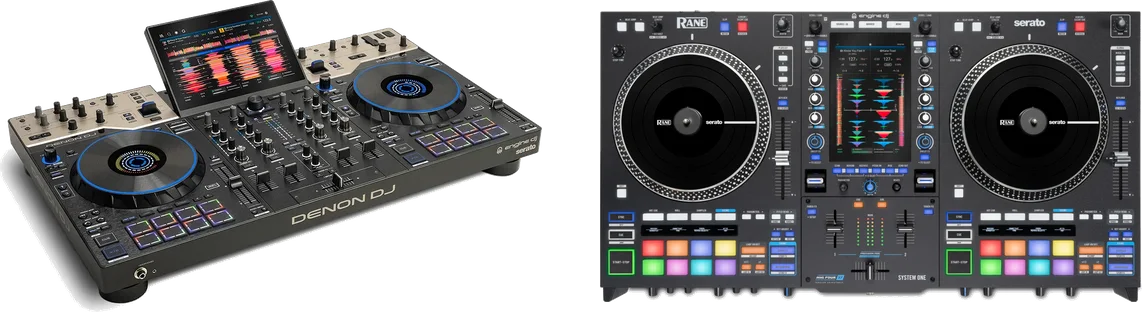
The RANE SYSTEM ONE is the two-deck choice if the platter has to turn under your hand. It runs Engine DJ for standalone playback. Its optional Serato computer mode has separate requirements: Engine DJ 4.6.0 or later and Serato DJ Pro 4.0.3 or later. If you usually bring a laptop anyway, DJ controllers offer a wider range of prices and sizes. RANE SYSTEM ONE support
When comparing the two Engine DJ routes, think about what your hands need during a set. Four mixer channels leave room for more playing sources. Motorized platters give your fingers a moving surface. One benefit does little to replace the other. If you are upgrading from a two-channel controller, sketch which tracks or sources would use channels three and four. If you cannot name them but keep wishing your jogs moved, try the SYSTEM ONE before buying a four-deck rig.
Do the computer-mode check separately from the USB check. On the SYSTEM ONE, confirm the installed Engine DJ version, the laptop’s supported operating system and the Serato version you intend to run. Then play some local tracks with the laptop disconnected. That gives you a repeatable check for both ways you might use the system, including a set where the computer or internet will be unavailable.
FAQ
Can I play a standalone system without Wi-Fi?
Yes. Bring compatible locally stored tracks on the storage the unit accepts. Wi-Fi access matters when you use cloud or streaming features.
For a travelling rig, check the media path with the same storage type you will use on the night. A system can play locally and still reject a particular drive format or plug. Try loading tracks from a second prepared drive as well if you intend to carry one as a backup.
Do I still need a mixer?
An all-in-one system has its own. Check the inputs if you also want to bring turntables, extra players or microphones.
Does four-deck playback mean four sets of deck controls?
The models here have two control surfaces. On a four-deck system you use deck selection controls to reach the two other decks.
Sources.
Continue reading
Read next.
 Crate digging~5 min read
Best 4-Channel DJ Controllers for Decks and External Gear
Compare four-channel DJ controllers by software decks, analogue inputs and mixer operation. Check what your turntables and media players can use.
 Crate digging~6 min read
Best Serato DJ Controllers by Licence and Layout
Compare Serato controllers by Lite and Pro entitlement, platter type and inputs. See which hardware needs a subscription or an extra licence.
 Crate digging~6 min read
Best DJ Controllers for Scratching
Compare static and motorized jogs, crossfaders and battle layouts. Pick a scratch controller that works with your software and budget.
 Crate digging~5 min read
Best Budget DJ Controllers Under $300
Compare affordable DJ controllers by software, controls, cueing and outputs. See what to buy under $300 and when the FLX4 is worth extra.