DJ gear
Best Serato DJ controllers
Compare Serato controllers by Lite and Pro entitlement, platter type and inputs. See which hardware needs a subscription or an extra licence.
What the controller unlocks
| Controller | With hardware connected | Paid Serato consideration | Main buying reason |
|---|---|---|---|
| Pioneer DJ DDJ-FLX4 | DJ Lite | Upgrade to DJ Pro if you need it | Low-cost two-channel start |
| AlphaTheta DDJ-GRV6 | DJ Pro | No direct phono input for control vinyl | Four software decks |
| Pioneer DJ DDJ-FLX10 | DJ Pro | DVS expansion for control vinyl or CDs | Analog deck inputs and rekordbox alongside Serato |
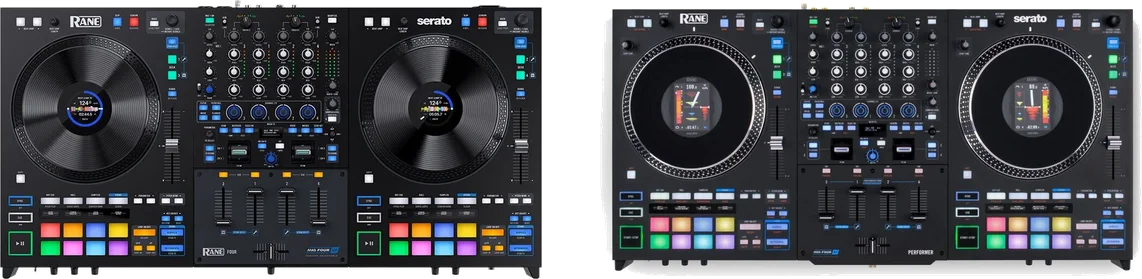
| RANE FOUR | DJ Pro | DVS expansion for control vinyl or CDs | Fixed jogs and dedicated track-separation controls |
| RANE PERFORMER | DJ Pro | DVS expansion for control vinyl or CDs | Four channels and motorized platters |
Serato detects the controller when you connect it and activates the supported edition. If you switch from a Pro-unlock controller to one that unlocks Lite, you need your own Pro licence or subscription to keep using Pro. Compare Serato’s hardware listings before buying a unit with a similar name.
Look up the model in three places on the hardware page before comparing prices: the edition it unlocks, the features it lists as upgrades, and the applicable downloads or operating system requirements. Write down the feature you are paying for. A buyer who needs Pro only while the controller is connected has a different purchase to make from someone who wants the same Pro access when they change to a Lite device. If you already pay for software, check what the account gives you before counting the controller’s unlock as savings.
For example, compare a Lite controller plus the Pro licence you would need with a controller that activates Pro directly. If you plan to play control vinyl, add the applicable DVS entitlement and control media to the hardware cost. If you plan to use regular records on external inputs, check the audio routing for that configuration. Attaching a turntable and using it to control digital tracks are different purchases even if the lead runs to the same socket.
Start in Lite or choose a controller that unlocks Pro
The FLX4 is a $329 first controller with two channels and a free Serato DJ Lite unlock. Test the feature you care about on your supported computer. If basic two-deck mixing is enough, you can keep the lower hardware and software spend. If you already need more channels in Pro, the $899 GRV6 gives you four software decks and a hardware unlock for the app. The beginner controller guide has more to say about the first purchase across apps. Serato FLX4 · Serato GRV6

The FLX10 adds external audio inputs. It is the one here to consider if you also want the option of running rekordbox on the same controller. Serato separately lists a paid DVS upgrade for using control vinyl or CDs on it. Check the four-channel controller guide if inputs and mixer faders are driving your decision. Serato FLX10
For an FLX4 buyer, start with the normal two-deck workflow on the computer you already own. Plan which features you will use on every set and check whether they are available in the Lite edition. Add the upgrade to your budget only if there is a feature you will actually need. For a GRV6 buyer, apply the same check to four decks. If you want only the Pro edition, a hardware unlock is one route. If you also want four software channels and controls for those channels, the GRV6 solves both problems with one purchase.
For the FLX10, decide which sets would use rekordbox and which would use Serato. Confirm the controller in both manufacturers’ compatibility lists and try each supported setup independently. Use a few familiar tracks and check the settings and playlists you will need. A controller that works with two apps gives you a choice at home. It does not automatically put a computer-based Serato library on media for a rekordbox booth.
Choose the RANE by the feel of the jogs
The RANE FOUR has fixed jog wheels and separate controls for track parts. The PERFORMER gives you moving platters while keeping four channel faders. Both unlock Pro when connected. A two-channel battle layout may suit you better if you rarely use more than two software decks. See the scratch controller guide for that choice. Serato RANE FOUR · Serato RANE PERFORMER
If your main club library lives on a rekordbox USB, compare rekordbox and Serato before switching libraries. Serato computer control and standalone playback are separate features.
If you are choosing between the two RANE controllers, take the Pro unlock out of that particular comparison because both models provide it. Use the same Serato settings and the same track on each, then check whether you prefer the moving surface and whether the case fits your transport and booth. If DVS is part of the plan, check the separate entitlement for either choice. Before buying used, ask to connect the exact unit and check whether Serato brings up the edition listed for it. Try a headphone cue and a sound output during the same check. That verifies something more useful than a seller’s photo of the controller connected to power.
Put one real setup on each side of a cost comparison. A laptop and two-deck controller can be enough to play files in Lite. For two decks and a four-fader Pro controller, price the computer, controller and the features you intend to use. For two turntables playing control vinyl, add a pair of control records if you do not already have them and check the software entitlement. Separate out the parts you already own. This makes the gap between two controllers easier to judge when their sticker prices leave out different pieces of the setup.
Before buying for a specific Serato feature, check how you will invoke it. Dedicated buttons on the FOUR can be useful if you repeatedly bring in or remove the same track parts during a set. If it is a feature you only need for preparation, test that part of the workflow before choosing a controller for its hardware buttons.
FAQ
Can I use Serato DJ Pro on a controller that unlocks Lite?
Yes, if Serato lists the exact hardware as eligible for the upgrade and you have a Pro licence or subscription. Verify your model and operating system before paying.
Do Serato DJ Pro controllers include DVS?
Some can use it with a separate entitlement. Serato marks DVS as a paid upgrade on the FLX10, RANE FOUR and RANE PERFORMER pages. You also need compatible audio inputs and control media.
Does a hardware unlock work with a used controller?
For hardware that unlocks Serato directly, the software detects the connected unit. A separate account activation or voucher works differently. Confirm what the listing promises and look up the controller in Serato’s directory.
Sources.
Continue reading
Read next.
 Crate digging~6 min read
Best DJ Controllers for Scratching
Compare static and motorized jogs, crossfaders and battle layouts. Pick a scratch controller that works with your software and budget.
 Crate digging~5 min read
Best Budget DJ Controllers Under $300
Compare affordable DJ controllers by software, controls, cueing and outputs. See what to buy under $300 and when the FLX4 is worth extra.
 Crate digging~5 min read
Pioneer DJ DDJ-FLX4 vs DDJ-400
Choose between a new DDJ-FLX4 and a used DDJ-400. Compare software, ports, mic routing and the checks to make before paying for a used controller.
 Crate digging~5 min read
Best Standalone DJ Controllers for USB and Laptop-Free Sets
Compare standalone DJ systems by USB library, decks, battery power, audio outputs and motorized platters. Pick an all-in-one for your workflow.