DJ gear
Best DJ controllers for scratching
Compare static and motorized jogs, crossfaders and battle layouts. Pick a scratch controller that works with your software and budget.
Choose where your hands land
| Controller | Platter | Layout detail | Software starting point |
|---|---|---|---|
| Pioneer DJ DDJ-REV1 | Fixed | Pitch faders above the jogs | Serato DJ Lite |
| Pioneer DJ DDJ-REV5 | Fixed | Larger jogs and MAGVEL crossfader | Serato DJ Pro or rekordbox |
| Hercules DJControl Inpulse T7 | Motorized | Two moving platters at a lower cost | Serato DJ Lite or DJUCED |
| Pioneer DJ DDJ-REV7 | Motorized | Battle-style layout and MAGVEL FADER PRO | Serato DJ Pro or rekordbox |
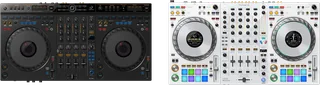
The REV layout puts tempo sliders across the top of the deck area and the performance pads near the middle. That arrangement copies the general shape of a pair of rotated turntables around a battle mixer. Look at the gap between the crossfader and the controls your hand will pass. Cut-in distance, how far you move the fader before the channel opens, also affects how the layout feels.
Place the controller where you would actually play and reach for both jogs without moving the unit. Check that your fader hand clears the nearby knobs and pads and that the laptop stand or monitor does not take away the space your other hand needs. If you work with your hands on the opposite sides from another DJ, check the layout that suits each person instead of buying for the way one demonstrator stands. Look for fader curve and cut-in settings in the manual for the exact model. Those settings are useful when the gap before the sound opens is what bothers you about your current controller.
A fixed jog with the battle layout
The DDJ-REV1 is the inexpensive starting point. Pioneer DJ’s U.S. store lists it at $299 before any sale. Check you have the supported laptop and app, then decide whether you need anything beyond Serato DJ Lite. The REV5 goes bigger on the jog surfaces and crossfader. It supports Serato DJ Pro and rekordbox and makes sense for a DJ who wants more controls without carrying a pair of motors. Pioneer DJ REV1 · Pioneer DJ REV5
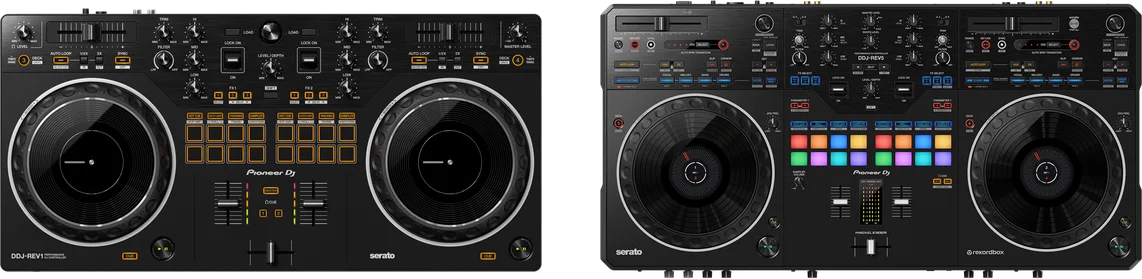
Choose the REV1 if your first decision is about putting the pitch control and pads in a better position. A larger fixed jog on the REV5 changes how much surface your palm can reach without changing to a moving deck. Before paying for either change, turn on the jog’s touch mode and check the response with a track near a clear transient. Use the same sound and software settings if you try the other model. The test should tell you whether the control surface feels comfortable and whether the fader behaves predictably when you open it repeatedly.
A moving platter under your fingers
Hercules lists the Inpulse T7 at $849.99 in the U.S. It has two motorized platters and works with the included Serato DJ Lite or DJUCED. Check the paid licence if you need a feature in Serato DJ Pro. The two-channel REV7 adds the MAGVEL FADER PRO and displays in the jog wheels. Measure the controller with its case before bringing it to a shared booth. If you also play on four channels, see the four-channel controller guide. Hercules Inpulse T7 · Pioneer DJ REV7
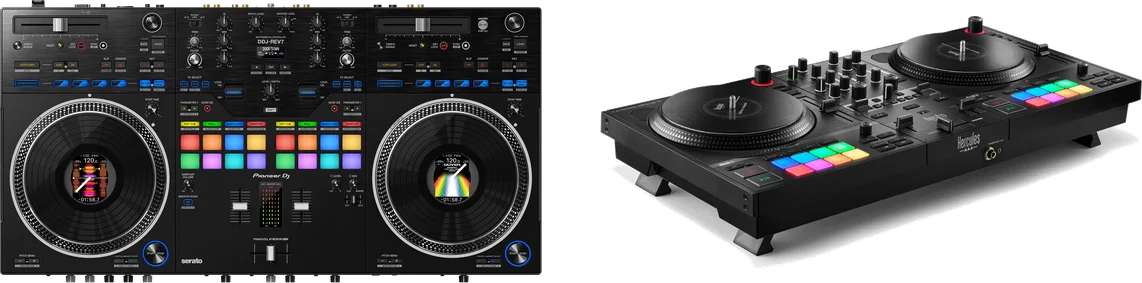
On a moving deck, compare what happens while the platter runs under your fingers. Look for a comfortable grip and check whether you can see the status or position information you depend on without leaning over the controller. If a used unit is available to try, test both sides. Listen through headphones while checking for intermittent audio, confirm that both platters start reliably, and check that each side returns to normal playback after you let go. For an Inpulse T7 listing, verify the exact package and its accessories. Hercules sells versions with similar names, and the contents of a used listing depend on what the seller still has.
For a rig you will move between rooms, measure the external case and locate the socket for every lead you will need. Check where the laptop can stand without covering your hand movement. If one setup means carrying a larger case and another does everything your regular set requires, the transport difference may outweigh the feel of the moving deck.
Separate wear from layout when comparing used gear. A favourite design with a fader that jumps or a platter that responds inconsistently on one side is a repair decision as well as a purchase. Ask whether the fader or platter covers have been replaced and whether the original accessories are included. Use the same app and track on both sides when you check the hardware, then swap the headphones or lead if the fault could be outside the controller. Plan around the price of the complete working kit.
Keep the turntables if you like the feel
A battle mixer is a smaller change for someone who already has a pair of DJ turntables. The Pioneer DJ DJM-S11 is an example. It takes phono sources and offers a scratch-focused fader layout. If your music is digital, check the supported timecode setup and software before changing the hardware. Compare DJ mixers and DJ turntables if the decks or mixer are a separate purchase.
List the pieces you already own before pricing a replacement. On a two-turntable setup, check that the decks, cartridges, needles and channels all work. A mixer upgrade solves a fader or routing problem while keeping the motor and record surface you know. A controller may make more sense if you are also trying to make the whole system smaller or simplify carrying music. If you switch between records and control vinyl, check the connections and software for both uses while the mixer is still on your shortlist.
Check the signal path for each source you will carry. A conventional record feeds the mixer as audio. With control vinyl, the turntable supplies a control signal and the computer still needs its own music library. Confirm the exact mixer and software pairing and account for the extra leads or media before buying only the mixer.
FAQ
Can I scratch with a controller that has fixed jog wheels?
Yes. A supported touch-sensitive jog gives you control over the playback position. Motorized platters add the motion and resistance of a spinning surface.
Can I use the REV1 without a laptop?
It is a computer controller. Check the requirements for Serato DJ Lite or a supported alternative before buying. A standalone DJ system has its own playback engine.
Is a two-channel controller enough for scratching?
Yes, if you want one source on each side of the crossfader. Four channels become useful if you also need separated parts, extra decks or outside sources under their own faders.
Sources.
Continue reading
Read next.
 Crate digging~5 min read
Best Budget DJ Controllers Under $300
Compare affordable DJ controllers by software, controls, cueing and outputs. See what to buy under $300 and when the FLX4 is worth extra.
 Crate digging~5 min read
Pioneer DJ DDJ-FLX4 vs DDJ-400
Choose between a new DDJ-FLX4 and a used DDJ-400. Compare software, ports, mic routing and the checks to make before paying for a used controller.
 Crate digging~5 min read
Best Standalone DJ Controllers for USB and Laptop-Free Sets
Compare standalone DJ systems by USB library, decks, battery power, audio outputs and motorized platters. Pick an all-in-one for your workflow.
 Crate digging~5 min read
Best 4-Channel DJ Controllers for Decks and External Gear
Compare four-channel DJ controllers by software decks, analogue inputs and mixer operation. Check what your turntables and media players can use.