DJ gear
CDJ vs DJ controller
Compare CDJs, laptop controllers and standalone DJ units by where audio plays, how they connect, and what you need to supply at a venue.
What has to be connected?
| Setup | What plays the tracks | What you still need |
|---|---|---|
| Two CDJs | The two individual players | Mixer, compatible media, two deck-to-mixer audio paths and power |
| Laptop controller | DJ software on a compatible computer | Computer and cables, plus a licence when the hardware does not unlock the features |
| Standalone all-in-one | The unit’s own playback system | Compatible media and the relevant library export |
A CDJ’s screen, browse controls and jog wheel address one player. The CDJ-1500X and CDJ-3000X play digital media. The family name goes back to disc players. Older models, including the CDJ-2000NXS2, actually play audio CDs. The mixer handles cueing and blending the players. A Pro DJ Link network can share media between compatible units. Connect each player’s audio output to the appropriate mixer input as well.
A laptop controller sends commands to an app. Its audio interface normally handles the headphones and master output, but the app provides playback. Some controllers work with phones or tablets as well. Check the model’s documented software and connections before assuming a phone will replace your computer.
An all-in-one separates those jobs less visibly. It has its own playback and a mixer, so the master can go straight to an input on powered speakers or the venue system. Some also work with computer DJ software. Check the mode you are buying it for. A device called a controller in a shop listing might be a laptop accessory or a standalone system with an optional computer mode.
If you are setting up a modular pair, make space for the mixer and the two players, and check how the audio reaches each mixer channel. Label the connections for the left and right players before installing them. Check whether the mixer has the inputs and the output your speakers or venue expect. Those are separate checks from whether the USB library loads.
Buy for the place you’ll play
A controller is the smaller commitment if you already have the laptop and want to learn a two-deck layout. For booth preparation, confirm the exact player, mixer and rekordbox media format before spending on a matching rig. The CDJ-1500X and CDJ-3000X use OneLibrary for prepared cues and playlists. Older models such as the CDJ-3000 use the traditional Device Library. The CDJ buying guide compares these choices and explains the cost of buying two players.
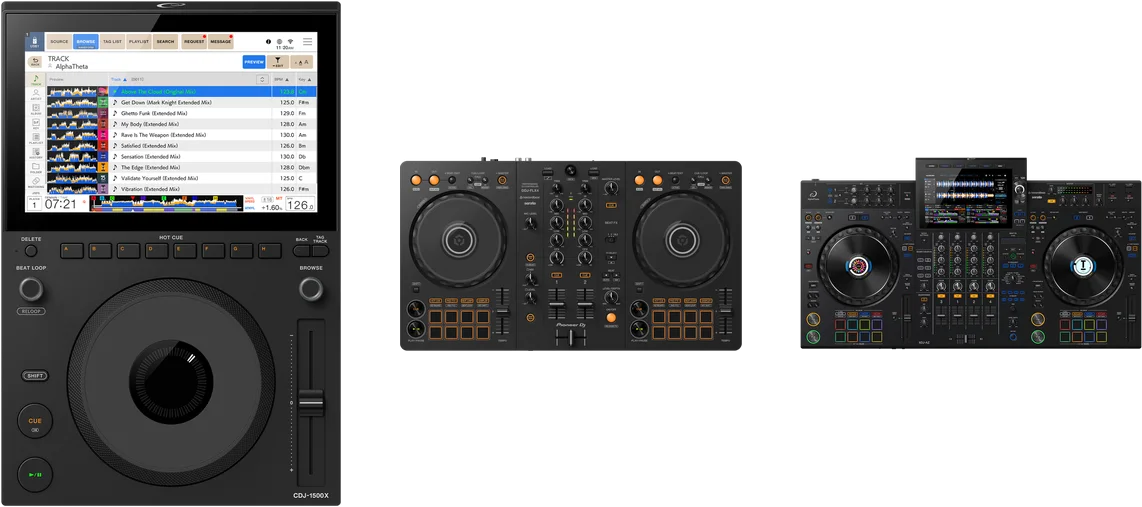
A standalone system saves connections when you haul your own rig. The integrated mixer sends the cue to headphones and the master to speakers. A repair can take the whole unit out of service. See the standalone system guide for USB rigs, or the DJ controller guide if you are happy to bring a computer.
If you chiefly play at a desk or in the same small room, start with the gear you already have. A working laptop, a controller that supports it and wired headphones give you a place to practise. Add speakers if the room needs to hear you. If your gigs regularly require carrying the whole rig, compare how many cases, power leads and audio connections you would have to set up for an all-in-one and a modular pair.
Separate players also let you replace one part of the rig without changing the others. This can be useful for an installed system or a kit shared by DJs. A removable player does not help if the venue cannot supply a spare, so price any backup you actually plan to keep. At home, renting booth time may cost less than buying two players just to learn their menus.
Before buying for a club booth
If the club owns the gear, ask for the player models and mixer before buying anything. Prepare a compatible drive and see whether a rehearsal room nearby has that setup. Pay particular attention to the browse screen, cue and loop controls, and which mixer channel each deck feeds. At home a controller remains a compact way to organise music and learn the layout. The setup cost guide lists example prices for an integrated rig and a modular pair.
For a club with its own setup, ask whether all players connect to the same network and which media or export the house expects. If you can only verify one deck, bring a separate drive if the venue says the other player might not see it over the network. Run a rehearsal with local files and check at least one stored playlist, one cue and the audio path to each mixer channel. If you are bringing a controller, ask which mixer or sound-system input it can use and what cables the venue already has. This lets you distinguish a missing connection from a reason to replace the whole setup.
FAQ
Do CDJs still play audio CDs?
Some older models do, including the CDJ-2000NXS2. The CDJ-1500X and CDJ-3000X are digital media players without an audio CD drive.
Do you need a laptop with CDJs?
A standalone CDJ can play supported local media without a laptop in the booth. A computer is useful before the gig to prepare playlists and export the library. Some compatible players can also work with DJ software on a connected laptop.
Can I plug a USB drive into my laptop DJ controller?
For a laptop controller such as the DDJ-FLX4, plug the drive into the computer and load tracks in the DJ app. A standalone all-in-one reads supported USB media at the deck.
Sources.
Continue reading
Read next.
 Crate digging~5 min read
AlphaTheta XDJ-AZ vs OPUS-QUAD
Compare the XDJ-AZ and OPUS-QUAD by layout, USB libraries, zone routing, player expansion and how each works in a booth.
 Crate digging~5 min read
Pioneer DJ DDJ-FLX4 vs DDJ-400
Choose between a new DDJ-FLX4 and a used DDJ-400. Compare software, ports, mic routing and the checks to make before paying for a used controller.
 Crate digging~5 min read
Best Standalone DJ Controllers for USB and Laptop-Free Sets
Compare standalone DJ systems by USB library, decks, battery power, audio outputs and motorized platters. Pick an all-in-one for your workflow.
 Crate digging~5 min read
Best 4-Channel DJ Controllers for Decks and External Gear
Compare four-channel DJ controllers by software decks, analogue inputs and mixer operation. Check what your turntables and media players can use.